
Envelope Sizes for Printing: C4, C5, C6, DL and #10 Explained
Which envelope holds which document, the exact ISO C and US sizes, and the printer settings that stop envelopes jamming, printing upside down or coming out scaled.
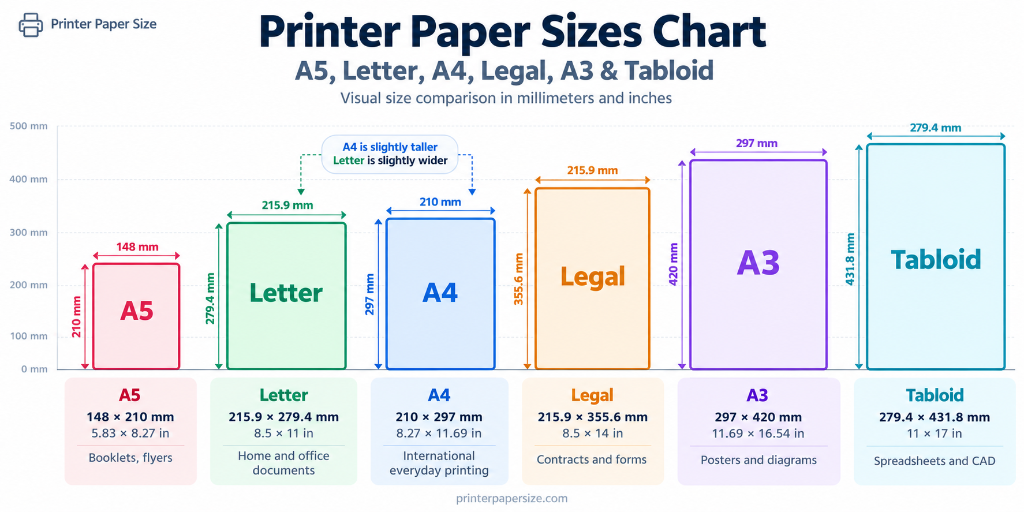
Envelopes are the paper format most likely to jam a printer, and the reason is usually a mismatch between the envelope, the driver and the feed method. The size itself is simple once you know what has to fit inside: an envelope is designed to be slightly larger than the document it carries.
The ISO C series
The C series is the envelope companion to the A series. Each C size is sized so that the matching A size fits inside, either flat or folded.
| Envelope | Dimensions (mm) | Dimensions (in) | Fits |
|---|---|---|---|
| C3 | 324 × 458 | 12.8 × 18.0 | A3 flat |
| C4 | 229 × 324 | 9.0 × 12.8 | A4 flat |
| C5 | 162 × 229 | 6.4 × 9.0 | A4 folded once, or A5 flat |
| C6 | 114 × 162 | 4.5 × 6.4 | A4 folded twice, or A6 flat |
| C7 | 81 × 114 | 3.2 × 4.5 | A5 folded twice, or A7 flat |
| C8 | 57 × 81 | 2.2 × 3.2 | Small cards and slips |
| DL | 110 × 220 | 4.3 × 8.7 | A4 folded in thirds |
DL is not part of the C series. It is a long, narrow format designed for a standard business letter folded in thirds. It is the most common envelope for invoices and statements in Europe and many other regions.
C4 and C5 are the workhorses of office mail. C4 sends a contract or certificate without folding. C5 sends an A5 booklet or an A4 letter folded once. C6 is the greeting-card and small-statement size, and DL is the window-envelope standard.
US envelope sizes
North American envelopes are quoted in inches and use a different numbering system.
| Envelope | Dimensions (in) | Dimensions (mm) | Typical use |
|---|---|---|---|
| #10 | 4.125 × 9.5 | 105 × 241 | Business letters, invoices, statements |
| #9 | 3.875 × 8.875 | 98 × 225 | Letters and direct mail |
| #6¾ | 3.625 × 6.5 | 92 × 165 | Personal correspondence, cards |
| 6 × 9 booklet | 6 × 9 | 152 × 229 | Booklets, catalogues, folded A4 |
| 9 × 12 booklet | 9 × 12 | 229 × 305 | Catalogues, certificates, A4 flat |
| A2 | 4.375 × 5.75 | 111 × 146 | Notes, invitations, reply cards |
| A7 | 5.25 × 7.25 | 133 × 184 | Greeting cards, invitations |
| A8 | 5.5 × 8.125 | 140 × 206 | Letters, announcements |
| A10 | 6 × 9.5 | 152 × 241 | Statements, catalogues |
The #10 is the standard business envelope. A US Letter sheet folds in thirds to roughly 3.7 × 8.7 inches, which slides into a #10 with a little room. A4 folded in thirds is slightly longer, which is why DL and #10 look similar but are not identical.
What fits: a practical check
Before printing, measure the internal dimensions, not the outside. Flap folds and side seams reduce the usable width. As a rule:
- Leave at least 5 mm of clearance on each side.
- Add 2–3 mm for a folded document; folds make paper slightly thicker and wider.
- Check the flap depth if the contents must not cover the window.
- For rigid contents such as card, use an envelope one size larger than the paper.
If you are unsure whether a card fits, compare the dimensions with the paper size converter and allow for the seam.
Printer settings for envelopes
Envelopes are not sheets of paper, and the driver needs to know that.
1. Select the envelope size, not “custom”
Most drivers include C4, C5, C6, DL and #10 in the paper size list. If yours does not, create a custom size using the measured width and height, including the flap. Do not select A4 and scale down; that changes the address position and can crease the envelope.
2. Choose the correct media type
Set Media type to “Envelope” or “Heavy paper” if available. This changes the fuser temperature and feed speed, which reduces curling and smudging on thicker stock.
3. Set the flap orientation correctly
This is the most common cause of jams and upside-down printing. The printer’s manual specifies whether envelopes feed flap-first or flap-last, and whether the flap should be open or closed. A flap that catches on the feed roller will jam; a flap that passes under the print head may be printed on.
As a starting point:
- Flap closed and folded inside for most inkjet manual feeds.
- Flap open for some laser printers, so the fuser does not seal it.
- Face up or face down depends on the model; check the tray diagram on the printer.
4. Print one envelope first
Address alignment is easier to fix before a stack of 50. Print a single envelope, hold it against the light, and check:
- The address block is inside the safe area.
- The return address does not collide with the flap or window.
- The text is not rotated 180°.
- The envelope is not creased or curled.
5. Feed one at a time if needed
Many office printers handle a small stack, but manual feed is more reliable for thick or embossed envelopes. Fan the envelopes, square the stack, and do not overfill the tray.
Designing the address block
Envelope layout is governed by postal conventions, not design taste.
- Address block: leave at least 15 mm from the left edge and 15 mm from the bottom for machine-readable sorting.
- Font size: 10–12 pt is safe; avoid decorative fonts and all-caps blocks.
- Line spacing: single spacing, no extra blank lines inside the address.
- Return address: top-left, smaller type, at least 8 mm from the top edge.
- Window position: align the address with the window before printing; do not rely on scaling.
- Barcode area: keep the bottom 15 mm clear of graphics and text in postal-automation layouts.
For window envelopes, print the letter so the address falls inside the window. A test print on plain paper, held behind the envelope, is quicker than printing the envelope twice.
Printing addresses directly vs labels
Direct printing looks better but is less forgiving. Labels are easier to align and work on printers that cannot feed envelopes reliably.
- Direct printing: best for small runs, branded envelopes and thicker stock.
- Labels: best for high volume, unusual envelope sizes, or printers with a difficult feed path. Use a label size that matches the envelope and set the driver to “Labels” media type.
- Handwriting or stamps: still valid for low volume; no printer settings required.
If you use labels, check the label sheet’s template alignment at 100% scale. A 2% scaling error accumulates across the sheet.
Troubleshooting envelope printing
The envelope jams at the top. The flap is catching. Try the other flap orientation, or feed one envelope at a time through the manual slot.
The print is upside down. The envelope is loaded the wrong way round. Rotate it 180° or change the orientation in the driver.
The address is shifted. The driver’s paper size does not match the envelope, or the envelope is not aligned against the guides. Set the exact size and check the feed alignment.
The ink smudges. The media type is set to plain paper, so too much ink is being laid down. Choose “Envelope” or “Heavy paper” and give the print time to dry.
The envelope comes out creased. The rollers are pulling unevenly. Reduce the stack height and make sure the envelope is flat, not curled.
The printer says “paper size mismatch”. The driver size and the physical envelope disagree. Select the exact envelope size, or create a custom size from the measured dimensions.
Frequently asked questions
Does an A4 letter fit in a C5 envelope?
Yes, folded once. A4 is 210 × 297 mm; folded to A5 it is 148 × 210 mm, which fits inside a C5 envelope (162 × 229 mm) with room for the fold.
What envelope fits an A4 sheet without folding?
C4 (229 × 324 mm). A4 is 210 × 297 mm, leaving about 19 mm on the width and 27 mm on the height for the flap and clearance.
Is DL the same as #10?
No. DL is 110 × 220 mm; #10 is 105 × 241 mm. They both take a letter folded in thirds, but the proportions differ and they are not interchangeable.
Can I print envelopes on any printer?
Most inkjet and laser printers can, but the feed path matters. Printers with a straight-through or manual feed are the most reliable. Check the manual for supported envelope sizes and flap orientation before buying a large box.